
For Texas EMS agencies
Trauma registry reporting, done in minutes, not days.
DispaWave turns your run reports into the NEMSIS v3.5 files the Texas EMS & Trauma Registry (EMSTR) accepts. Type them in or scan your paper reports. No ePCR system needed.
- Built for EMSTR's NEMSIS v3.5.0 rules
- Patient data never leaves your computer
- One monthly price for your whole crew
Reporting to the state shouldn't be the hardest part of the call.
Days to submit
Texas requires EMS data within 90 days of each call. Paper reports pile up fast.
Fields and codes
NEMSIS codes, ICD-10, "Not Values"… one wrong code and the upload is rejected.
ePCR systems
Full ePCR software is expensive and more than many small and volunteer services need.
Features
Everything you need to get your data to EMSTR, and nothing you don't.
Made for EMSTR
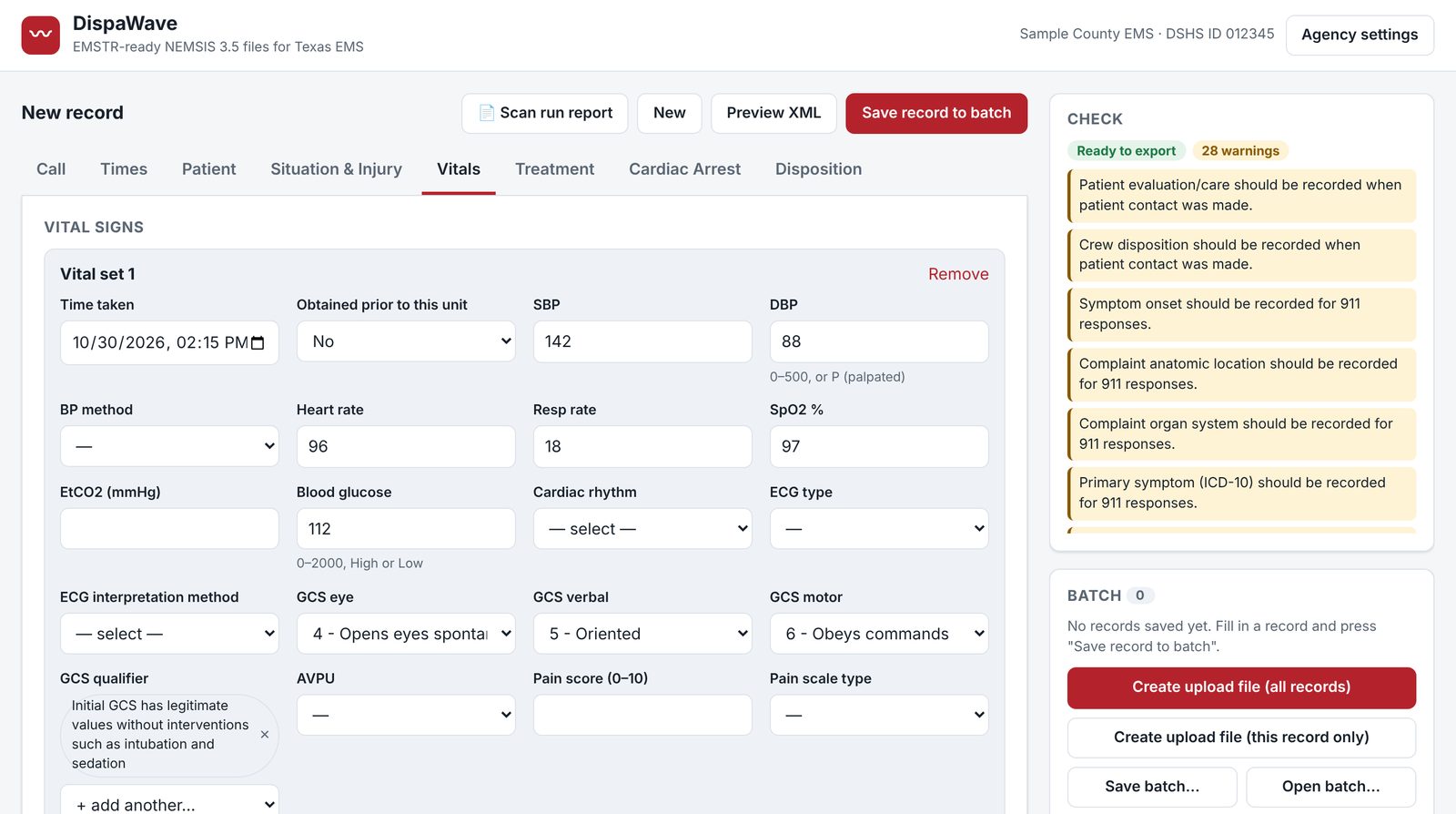
Creates NEMSIS v3.5.0 XML with Texas rules built in: 6-digit DSHS ID, incident county, possible injury, trauma wristband number.
Checks before you upload
Flags missing required fields, bad codes and out-of-order times as you type, so files go through the first time.
Scan paper reports
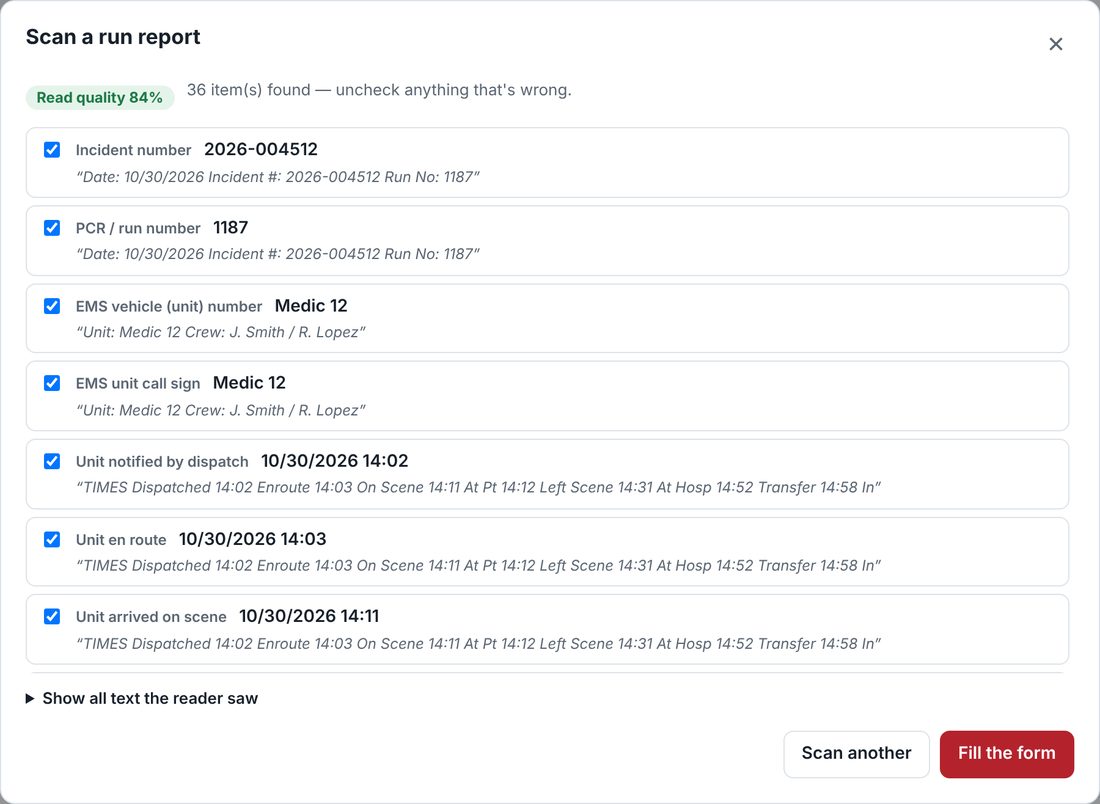
Snap a photo or scan a run report. DispaWave reads it and fills in the form. Your crew checks each item before export.
Batch many runs
Enter a week's or a month's calls, then create one upload file with all of them.
Logins for your crew
Your manager adds and removes medics. Everyone gets their own sign-in.
Private by design
Run report details stay in the browser on your computer. We never receive or store patient information.
Scan to fill
Still on paper? Start with a photo.
Take a picture of a run report (or upload a PDF). DispaWave reads incident numbers, times, patient details, vitals, medications, procedures and destination, then fills them into the form.
Everything it fills is highlighted in yellow until someone on your crew confirms it, so nothing goes to the state unchecked.
Works best with printed forms or neat block letters. The scan is read on your computer, not uploaded.
How it works
Four steps from run report to registry.
- 1
Enter or scan
Type the run report into simple tabs, or scan the paper copy.
- 2
Fix what's flagged
The checklist shows exactly what's missing or wrong. Click an item to jump to it.
- 3
Create the file
One click builds the EMSTR upload file for one record or a whole batch.
- 4
Upload to EMSTR
Sign in to EMSTR, choose File Upload → EMS XML, and pick the file. Done.
Privacy
Your patient data never touches our servers.
DispaWave runs in your web browser. Everything you type or scan about a patient, and the file you create, stays on your computer until you upload it to the state yourself.
Our servers only know your agency's name, DSHS ID, your team's logins and your subscription status.
- No patient data stored online
- Scans read on your computer
- Secure sign-in for each crew member
- Payments handled by Stripe
Who it's for
Built for small, rural and volunteer EMS.
If your crews write paper run reports, or you're catching up on months of registry submissions, DispaWave was made for you.
Simple monthly pricing
One subscription per agency, with no long-term contract. Includes:
- Logins for your whole crew
- Unlimited run reports and upload files
- Paper report scanning
- Updates when NEMSIS or Texas rules change
FAQ
Questions agencies ask
Does DispaWave upload to the state for us?
DispaWave creates the upload file. You upload it in EMSTR yourself (File Upload → EMS XML), which takes about a minute. That way patient data goes straight from your computer to the state.
Do we need ePCR software?
No. DispaWave is made for agencies that use paper run reports or need a simple way to submit to EMSTR.
Which NEMSIS version does it use?
NEMSIS v3.5.0, the version EMSTR accepts, with the Texas-specific requirements built in.
Can it read handwritten reports?
It reads printed forms and neat block letters well. Messy handwriting or cursive may need more typing. Everything it fills in is highlighted for your crew to check.
Do you store our patients' information?
No. Patient details stay in the browser on your computer. We only store your agency and login information and your subscription status.
How do we pay, and can we cancel?
Your agency manager adds a card through Stripe's secure checkout and is billed monthly. You can update the card or cancel anytime from the Billing page.
How do we get started?
Fill out the form below. We'll confirm your agency and email your manager a personal invite link to set up your account.
Get started
Request access for your agency
Tell us about your service. We'll review your request and email your agency manager a personal invite link to set up DispaWave.
- Send this form
- We confirm your agency
- Your manager gets an invite email, sets a password and starts the subscription
- Your manager adds the crew
Questions? Email us.